
Enterprise software delivery is hard, but there’s a better way. (part 3)
Part 3: How Tensor9 works
In Part 1, we explored the “problem landscape” and the operational nightmare of maintaining multiple product variants for SaaS, BYOC/VPC, and on-prem. In Part 2, we outlined the platonic ideal: a singular product that can be deployed anywhere.
Now, here in Part 3, we are going to look under the hood. We will explain the technical architecture that enables Tensor9 to deliver your existing SaaS stack into any customer environment, without rewrites.
The Really Hard Part: Operational Capability vs. Privacy with Environmental Variance
Before we dive into how it works, we have to acknowledge why this is so difficult. One of the things that makes enterprise software delivery hard is the fundamental conflict between your needs as a vendor, your customer's privacy requirements, and the sheer unpredictability of their infrastructure.
Operational capability vs. privacy: To provide a true "SaaS-like" experience with 99.9% uptime, seamless updates, and instant support, you need to remotely manage the deployment. You need visibility into crash logs, performance metrics, and infrastructure state. However, your enterprise customers (especially in finance, healthcare, or government) operate under a strict mandate: you cannot have access to their data.
Environmental variance, the complexity multiplier: This tension is compounded by the fact that no two customer environments are the same. One customer might be on a locked-down AWS VPC, another on Azure with specific egress proxies, and a third on a custom-hardened Kubernetes distribution.
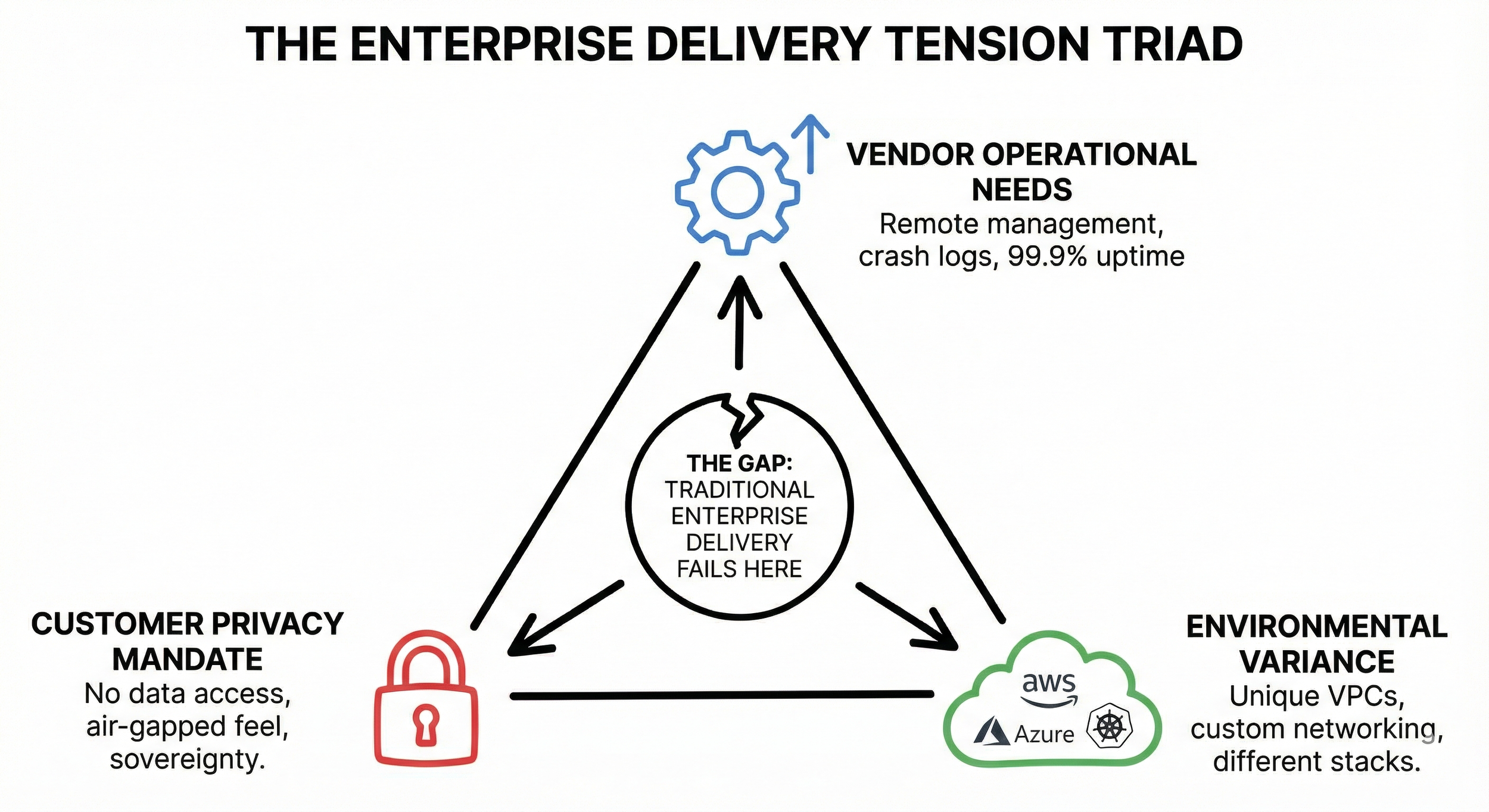
Ideally, you would be able to offer your customers the reliability of a managed service, but with the isolation of a vault. Historically, vendors have had to choose: give up operational access and let the customer struggle (the "throw it over the wall" method), or demand invasive access that security teams reject. Tensor9 was built specifically to resolve this tension: giving you top-notch operational capabilities without ever violating the customer's data sovereignty.
Decoupling Control from Compute
At its heart, Tensor9 separates your control plane (managed by you, the vendor) from your customer’s environment. This separation allows you to manage disparate environments as if they were a unified fleet.
The architecture consists of three primary components:
Control Plane: It orchestrates the lifecycle of your applications, manages the compilation of your infrastructure code, and aggregates observability data. It is provisioned directly within your own dedicated AWS account for Tensor9. This architecture ensures that your intellectual property, customer data, and infrastructure credentials always remain under your ownership and control.
Appliance: The secure, self-contained system deployed into your customer’s infrastructure (AWS, Azure, GCP, or On-Prem). The appliance orchestrates your software while ensuring all data remains under the customer’s strict control.
Controller: A lightweight agent that runs in both your control plane and in your customer’s appliance. It acts as the bridge, coordinating deployments, executing operations, and streaming telemetry.
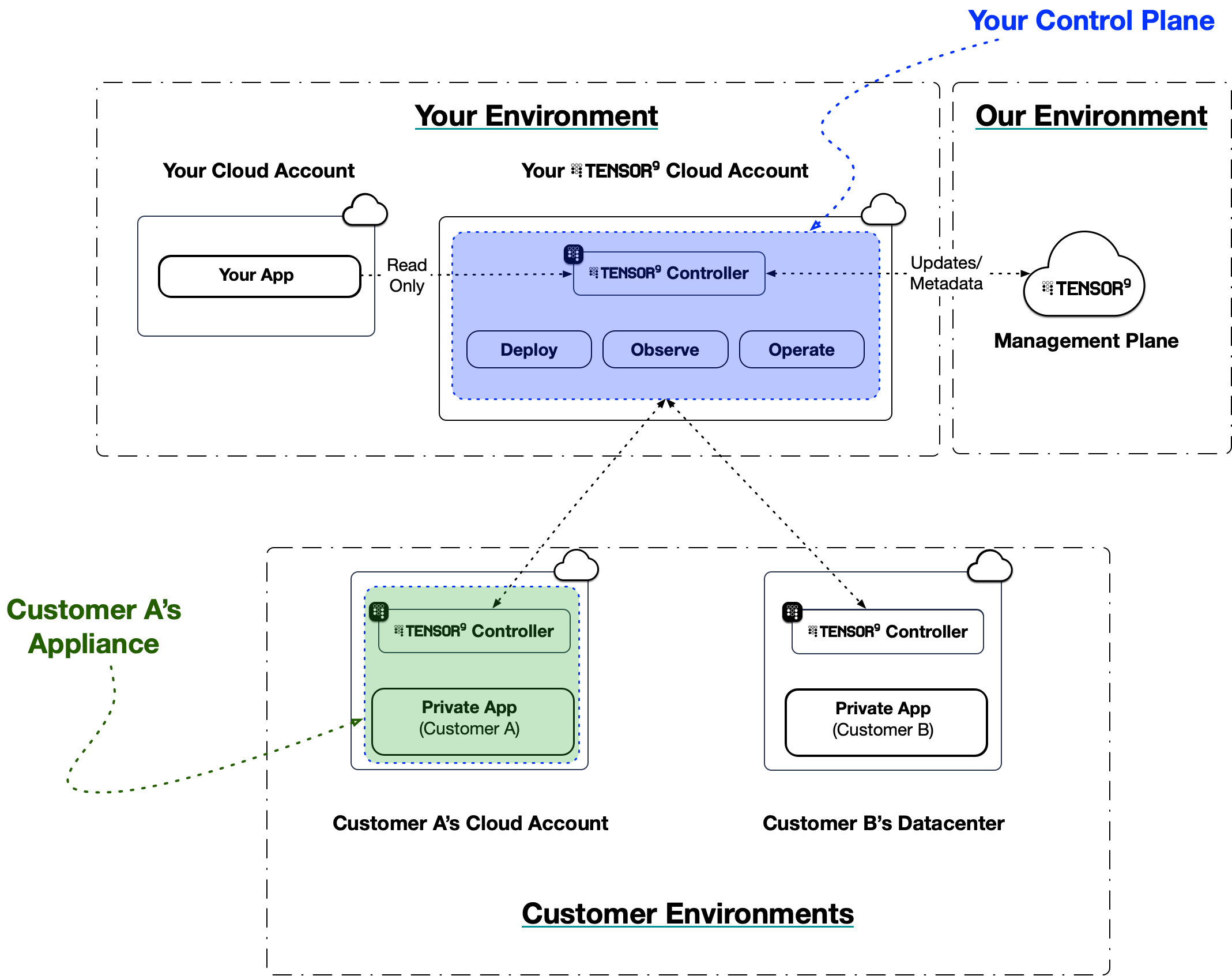
Tensor9 Control Plane Architecture
Your Origin Stack
The secret sauce of Tensor9 is how we integrate with your existing stack.
Most vendors managing customer-hosted deployments fall into the trap of building and maintaining essentially completely separate products for each environment, which is incredibly costly. Tensor9 helps vendors build, organize, and test customer-specific versions from a single source, helping them more easily distribute changes to each customer in any environment.
Tensor9 solves this by introducing the concept of an origin stack and a deployment stack.
One Origin Stack
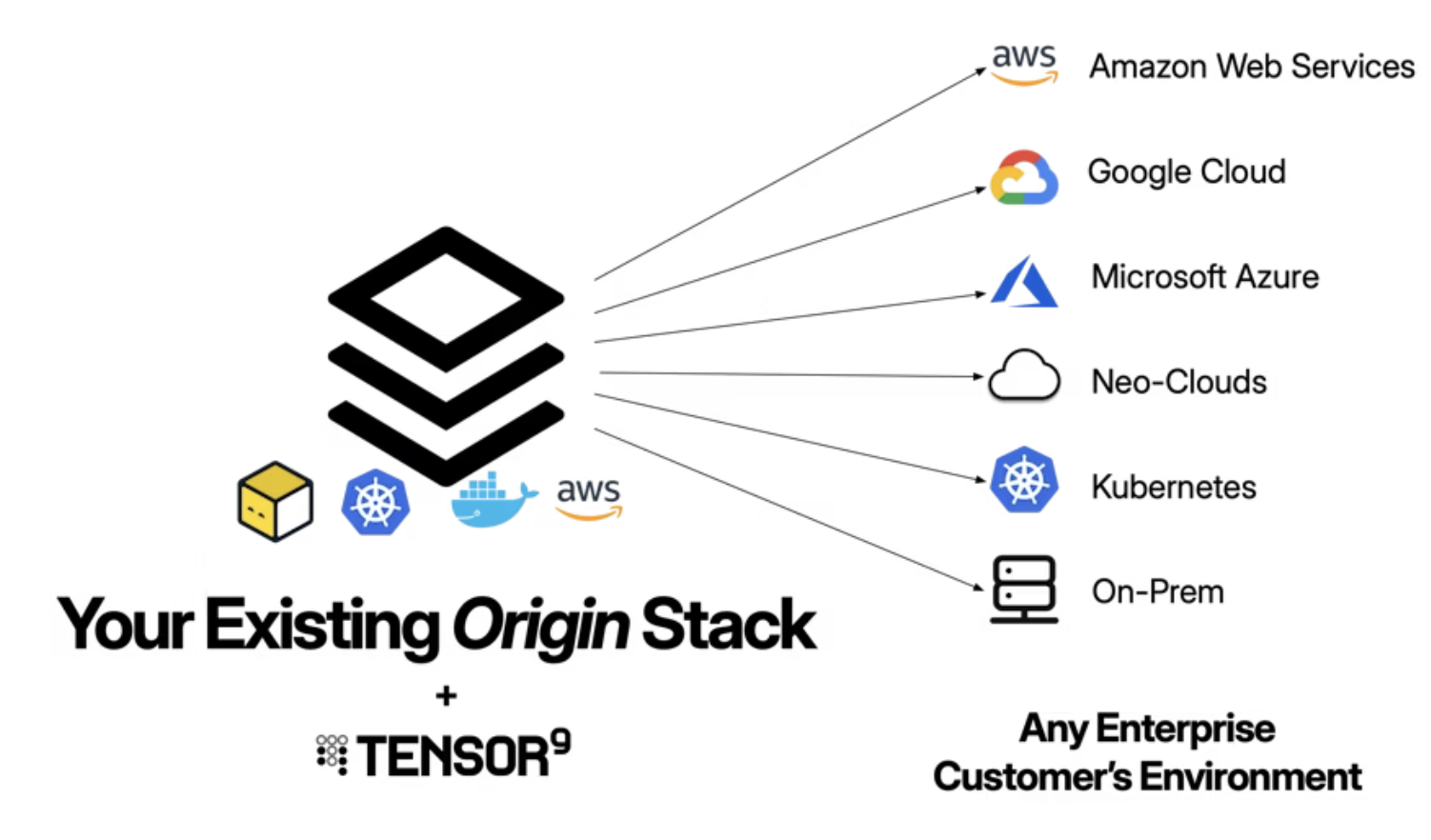
This is your “source of truth.” It is your existing infrastructure definition (Terraform, OpenTofu, Kubernetes, Helm, Docker Compose, or CloudFormation) that defines your application as if it were running in your own environment.
When you release a new version, the Tensor9 compiler (running in your own control plane) analyzes your origin stack and compiles it into a deployment stack:
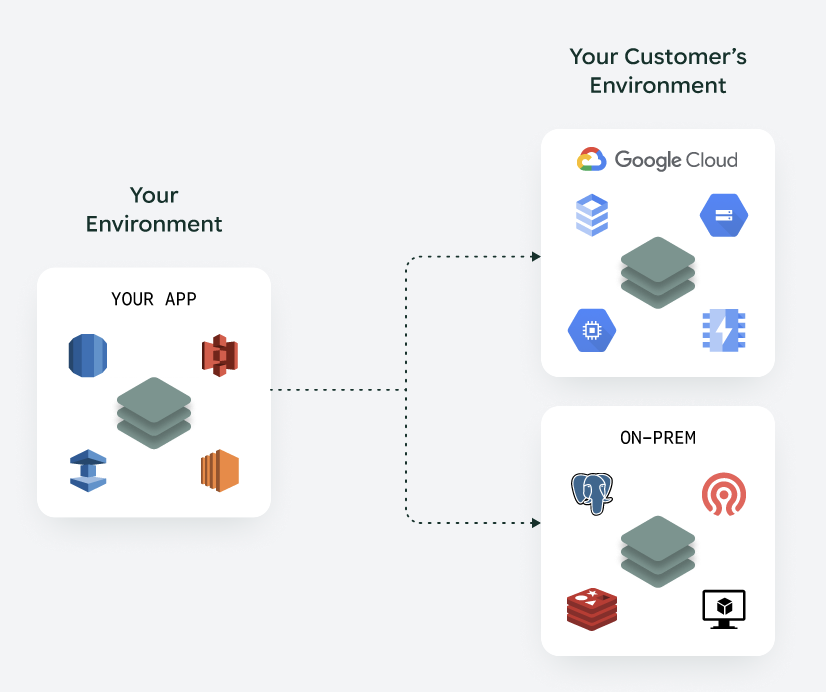
Service translation: It translates your managed services (like AWS RDS or S3) to their functional equivalents in the target form factor (e.g., mapping S3 to Azure Blob Storage for Azure customers, or to Google Cloud Storage for GCP customers, or to a MinIO cluster for on-prem customers).
Observability: It automatically instruments the infrastructure code to capture telemetry.
Artifact extraction: It scans your stack for container images, Lambda functions, Kubernetes helm charts, and other artifacts, copies them to a secure, appliance-local registry, and patches the references in your stack. This means that your customers have a private copy of the artifacts they need to use your application.
Secrets management: It automates secure data handling by prompting customers to input their private keys directly into the appliance based on your HCL definitions, while securely tunneling your vendor-owned credentials from your source store into their dedicated secret store to guarantee application access without exposing raw values.
Endpoints and DNS: It automatically generates publicly-accessible custom DNS hostnames and hosted zones for deployed appliances.
One Deployment Stack Per Customer
The output of this process is an executable, environment-specific artifact called the deployment stack. This is what you use to apply changes to a customer’s appliance. This is plain Terraform, so you can use your existing IaC deployment tooling (e.g., Atlantis, Spacelift, Terraform Cloud) and processes to deploy to your customers.
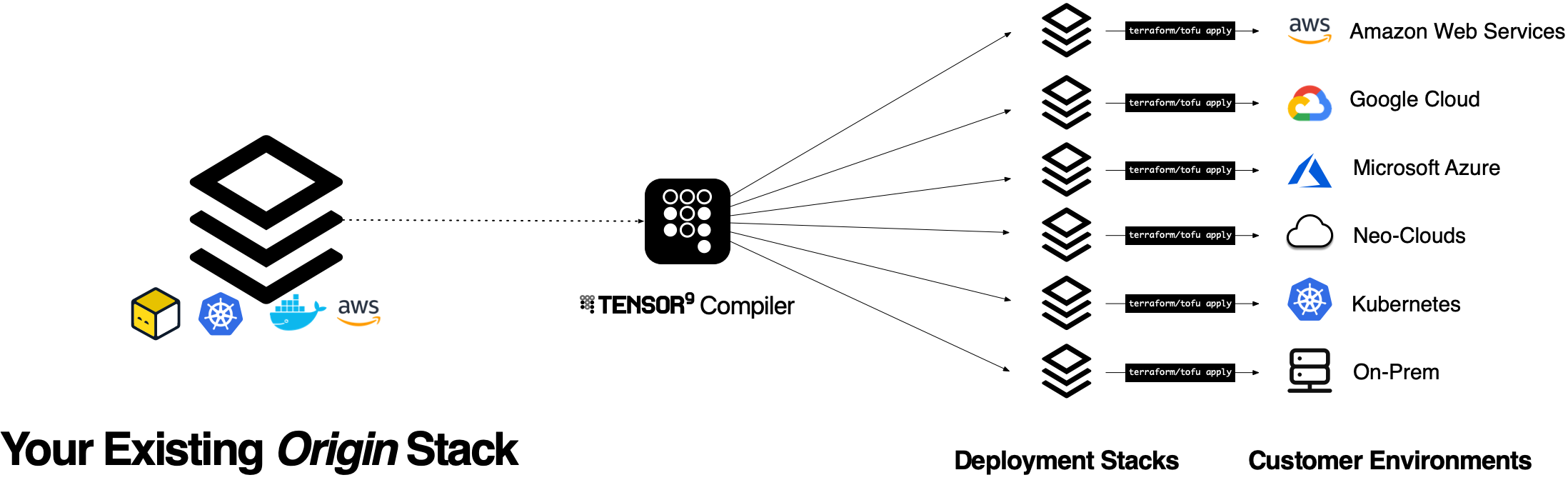
All of this means that you only ever maintain one product.
Service Equivalents
The true differentiator here is our service equivalents registry. Rather than requiring you to rewrite your stack around portable, self-managed alternatives, Tensor9 intelligently maps your managed services to the best available infrastructure in the target environment.
Here’s how common AWS services translate across environments:
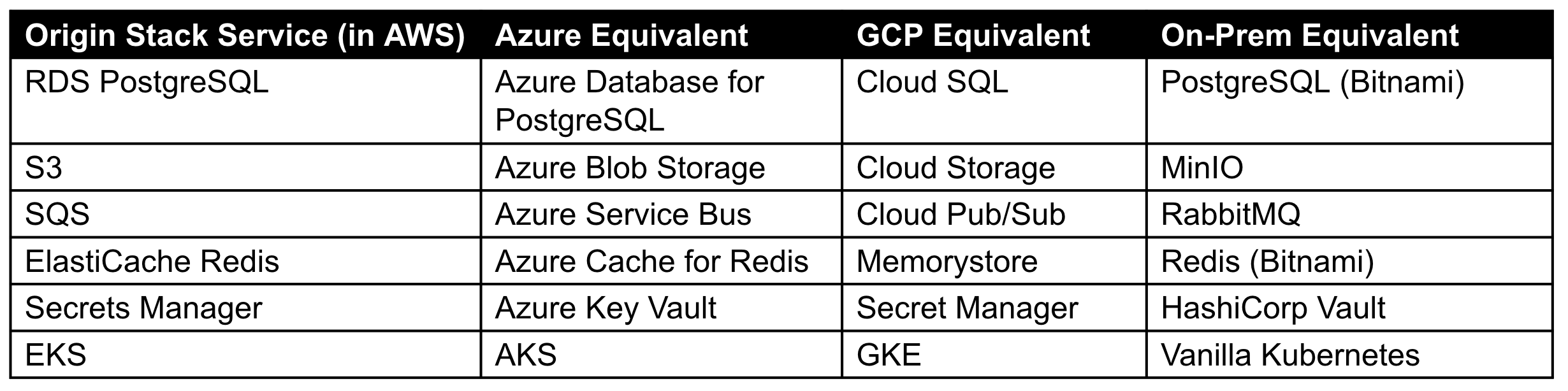
During compilation, Tensor9 analyzes your origin stack and automatically swaps proprietary services for their functional equivalents. For instance, an aws_db_instance (RDS) defined in your Terraform is translated into a google_sql_database_instance when deploying to GCP, or mapped to a self-healing PostgreSQL container cluster when deploying to an on-prem environment.
Transparency, not magic: You see exactly what will be deployed. The compilation produces standard Terraform/OpenTofu that you can inspect:
$ tensor9 stack release create -appName myapp -vendorVersion "1.2.0" \
    -customerName acme-corp

Compiling origin stack for acme-corp (azure-westus2)...

Service translations:
  aws_db_instance.main -> azurerm_postgresql_flexible_server.main
  aws_s3_bucket.data -> azurerm_storage_container.data
  aws_sqs_queue.jobs -> azurerm_servicebus_queue.jobs

Release 1.2.0 created for acme-corp.

$ cd deployments/acme-corp && tofu plan

Terraform will perform the following actions:

  # azurerm_postgresql_flexible_server.main will be created
  + resource "azurerm_postgresql_flexible_server" "main" {
      + name                = "acme-corp-main-db"
      + resource_group_name = "acme-corp-tensor9"
      + location            = "westus2"
      + version             = "14"
      + sku_name            = "GP_Standard_D2s_v3"
      ...
    }

Plan: 12 to add, 0 to change, 0 to destroy.
No black boxes. You get a standard tofu plan showing exactly what resources will be created in your customer’s environment. If something doesn’t look right, you can see why - and you can override specific translations when needed.
Observability
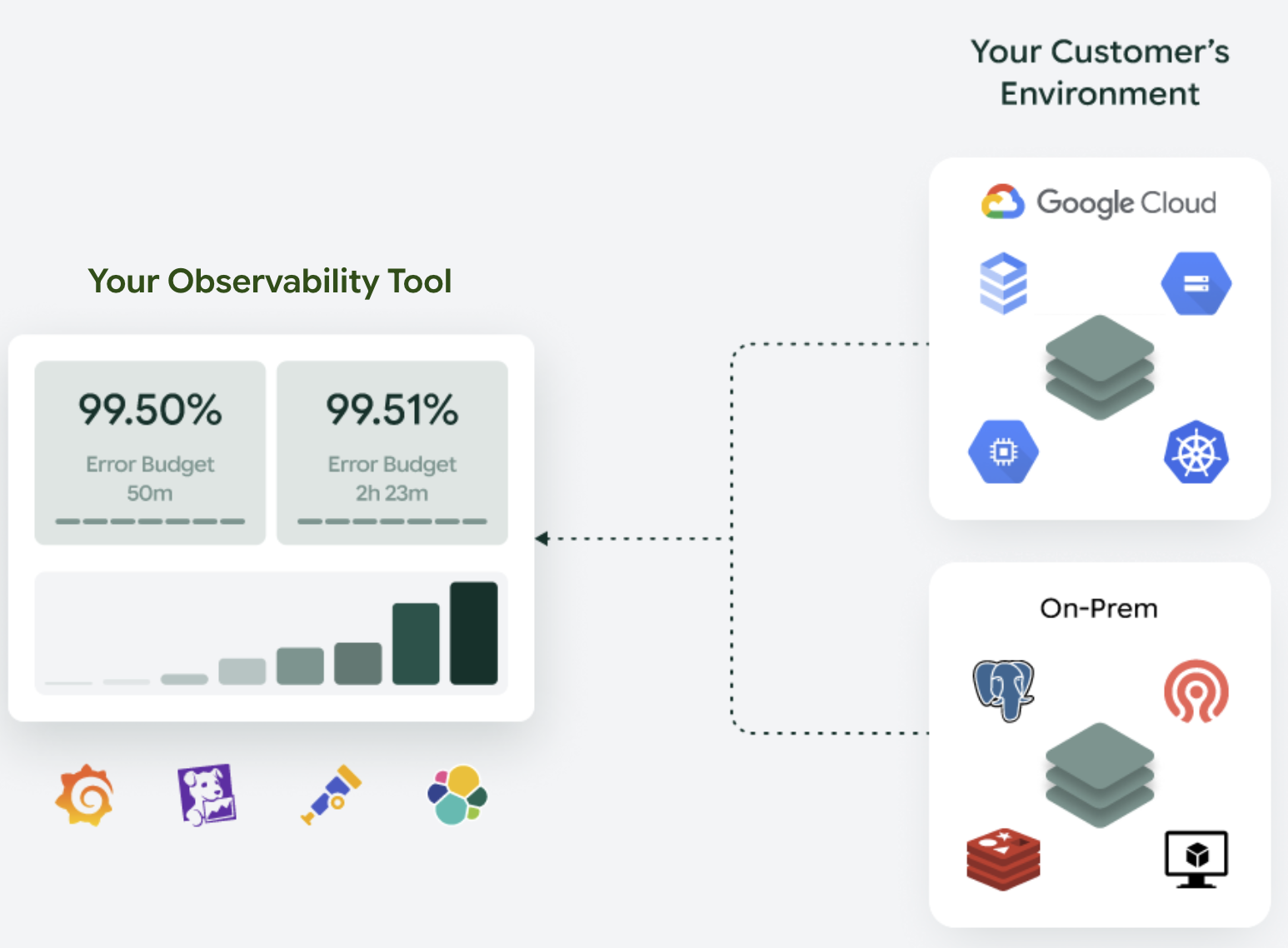
Opacity is the enemy of distributed software. Tensor9 ensures you are never blind to a customer’s issue by streaming logs, metrics and traces back to your configured observability sink. This means you have a single pane of glass across your cloud deployment and customer-hosted deployments.
We support forwarding telemetry to: - Datadog - New Relic - Grafana Cloud - Sumo Logic - Elasticsearch - CloudWatch - Google Cloud Logging - Azure Monitor - OpenTelemetry (for custom pipelines).
Because the compilation process automatically instruments your stack, every appliance is born with the ability to stream logs, metrics, and traces back home.
Local collection: Customer appliances collect telemetry from the deployed resources.
Synchronization: Data is securely tunneled back to your control plane and forwarded to your observability sink.
Your support team doesn’t need to learn a new tool or ask customers for screenshots. They simply query Datadog, filter by customer_id, and see the logs as if the software were running in your own cloud.
Secure Operations: The “Break Glass” Mechanism
When observability highlights an issue, you need to act. Tensor9 provides a secure operations endpoint to facilitate this.
Asynchronous operations are for routine tasks. You issue a command via the control plane, and the controller in the appliance picks it up:
$ tensor9 ops kubectl -appName myapp -customerName acme-corp \
    -originResourceId "aws_eks_cluster.main" \
    -command "kubectl scale deployment/api --replicas=3"

Operation queued for acme-corp...
Operation ID: op-7f3a2b1c
Status: pending_approval

# Customer approves via their dashboard...

$ tensor9 ops kubectl -appName myapp -customerName acme-corp \
    -originResourceId "aws_eks_cluster.main" \
    -command "kubectl get pods"

NAME                   READY   STATUS    RESTARTS   AGE
api-6d4f8b7c9d-x2k4m   1/1     Running   0          2m
api-6d4f8b7c9d-p8n3q   1/1     Running   0          2m
api-6d4f8b7c9d-j7w2v   1/1     Running   0          2m
Synchronous operations (tunneling) are for urgent debugging. Tensor9 establishes a temporary, secure tunnel:
$ tensor9 ops endpoint create -appName myapp -customerName acme-corp \
    -type kubectl -originResourceId "aws_eks_cluster.main"

Requesting tunnel to acme-corp...
Awaiting customer approval...
Tunnel approved by admin@acme-corp.com
Tunnel established. Endpoint ID: ep-9e8d7c6b

# Now you can run interactive commands
$ kubectl --context=tensor9-acme-corp logs deployment/api --tail=100
$ kubectl --context=tensor9-acme-corp exec -it deployment/api -- /bin/sh
All operations are logged. The customer sees every command in real-time.
The Permissions Model
Crucially, the customer retains ultimate authority over their appliance:

Tensor9 uses a four-phase permissions model where different lifecycle phases require different permission levels
This satisfies the strict compliance requirements of financial and healthcare institutions while giving your engineers the access they need to solve problems.
Coming Soon: Disconnected Mode
Everything above assumes the customer’s environment can reach your control plane. But what about customers who can’t - or won’t - allow outbound connections? Financial institutions with strict network policies, government agencies, defense contractors?
We’re building Disconnected Mode for these scenarios. Instead of real-time synchronization, you’ll package updates into signed bundles that customers transfer and apply themselves. Telemetry gets exported to encrypted files they can share through secure channels.
Same architecture, same tooling, different transport. We’ll cover the details in a future post.
Wrap
The goal of this series was to show that the friction of enterprise delivery isn't an inevitable tax on growth. It is a structural problem that can be solved with the right operational approach. For a long time, the industry accepted a binary choice: either you own the environment and the data (SaaS), or you lose visibility and the customer owns the headache (on-prem).
Tensor9 changes that equation. By treating customer environments as automated projections of your origin stack rather than bespoke "snowflake" installations, you gain two primary things:
Infrastructure Portability: Your software becomes environment-agnostic through automated service translation, not manual rewrites.
Operational Parity: Your support and engineering teams use the same observability tools and operational workflows they already know.
You keep your stack. You keep your tools. You just deliver them everywhere.
See how your stack translates
The best way to understand our approach is to see it in action. If you’re curious about how your AWS-native stack would look running in a BYOC Azure environment or an on-prem Kubernetes cluster, let’s talk.
Reach out to schedule a demo with your actual stack. Bring your Terraform, and we’ll show you what the compiled output looks like for a target environment of your choice.
